Benefits
Fast on every device
Loads after your content and stays light, so your pages keep their speed.
Accessible by default
Keyboard paths, screen-reader labels and a list view that works without the map.
Fits your theme
Inherits your fonts and colours. No extra styling to fight with.
Real support
Write to the people who built it and get a clear, honest answer.
Features
Everything a store locator needs, nothing it doesn’t
01 · On your storefront
Store list and map, side by side
The Default layout shows every store in a clear list next to the map. Shoppers can scan, compare and choose in a few seconds.
- Nearest stores first
- Store cards with address, phone and hours
- Pagination for long lists
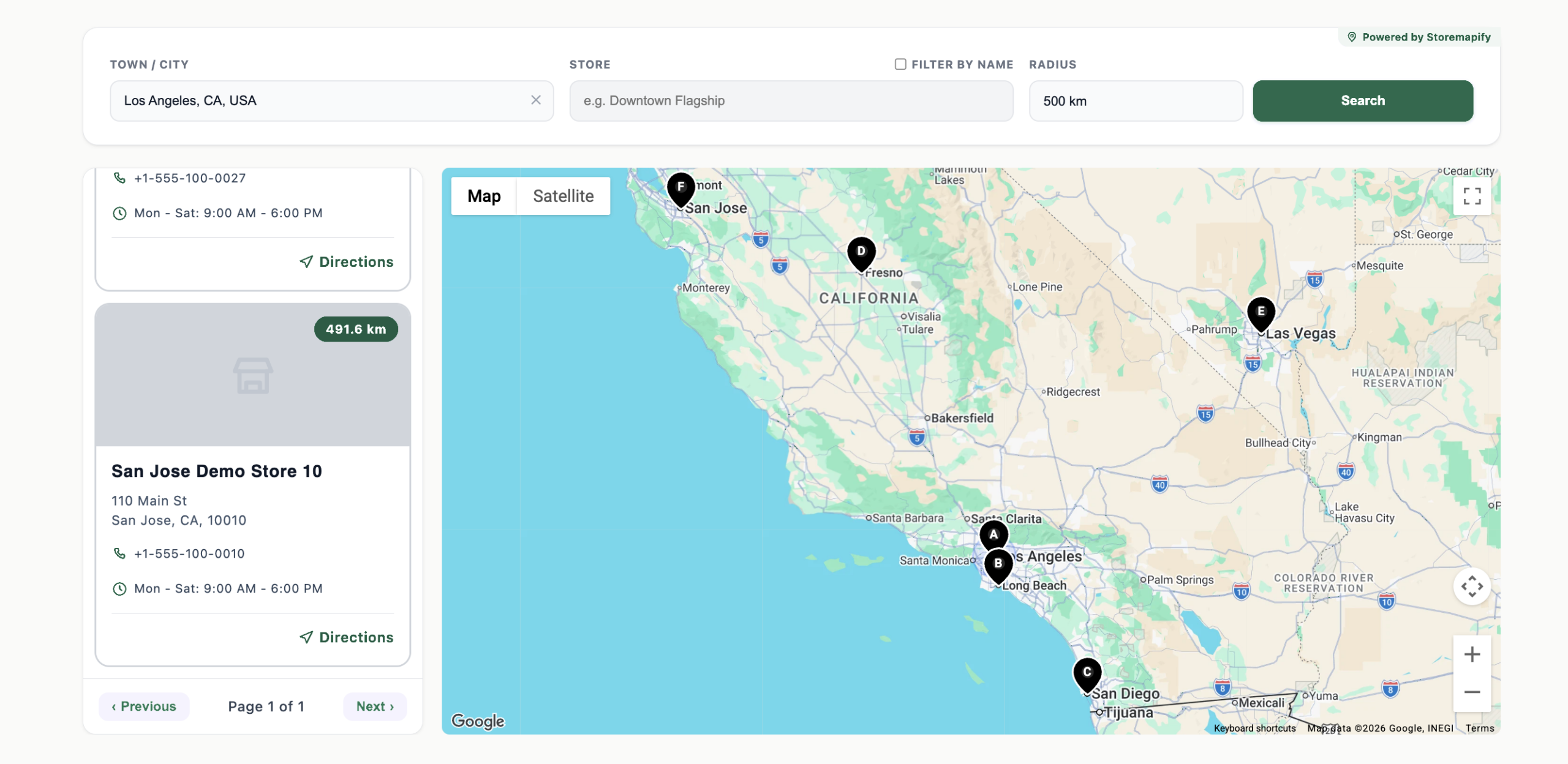
Default layout
Or keep it minimal
The Minimal layout puts the map first, with a compact panel that opens when shoppers need it. Calm and visual on any page.
- Map fills the space
- Panel folds away on small screens
- Same data, a lighter look
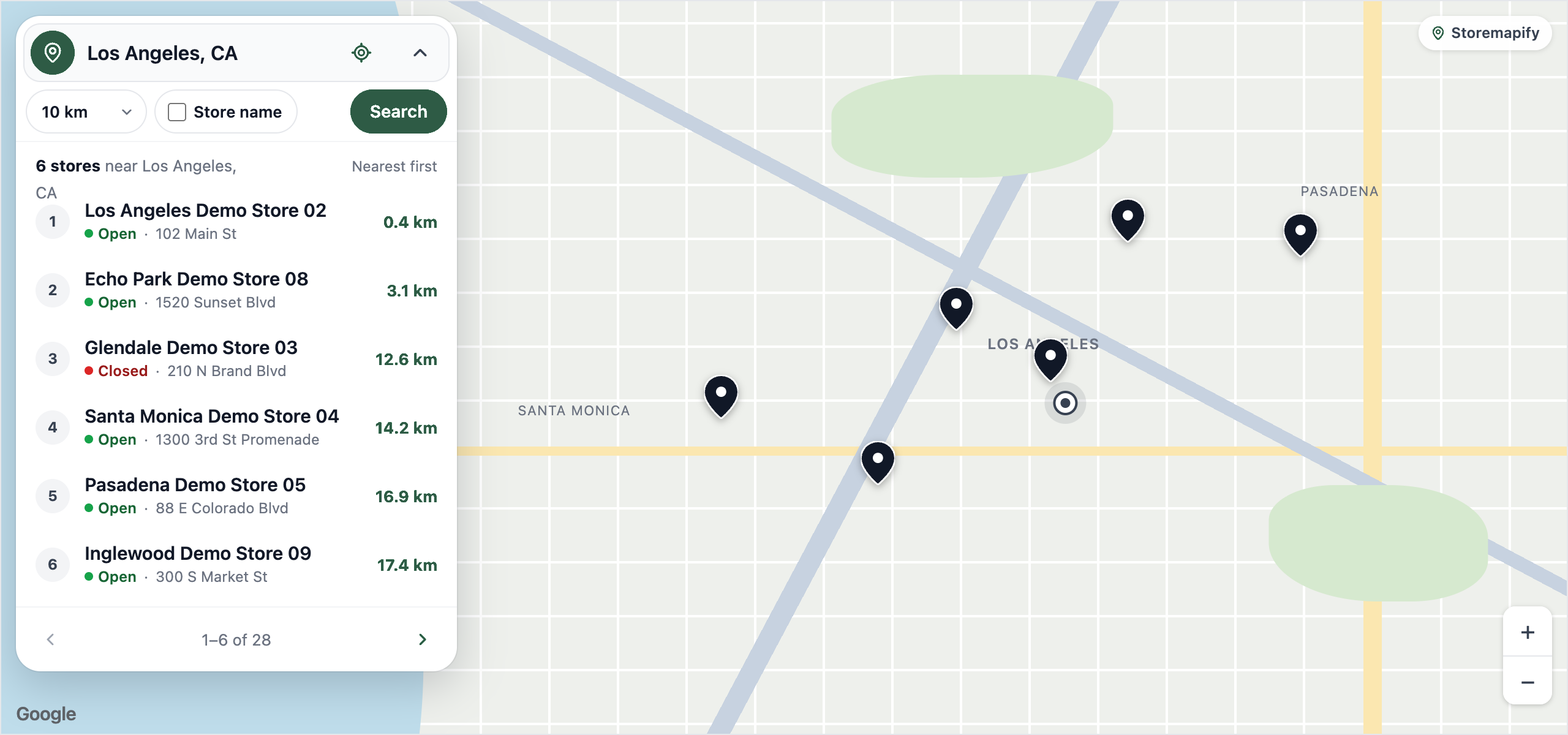
Minimal layout
Search and filters
Search by town or postcode, with suggestions as they type.
Easy directions
One click opens directions to the chosen store.
Open or closed
Today’s status shows on every store, at a glance.
A page for every store
Each location gets its own page with all its details.
02 · Adding stores
Add a store in one calm form
Name, address, contact details and options sit on one page. Nothing is hidden behind extra steps.
- Clear labels and helpful errors
- Save as active or inactive
- Edit any store later
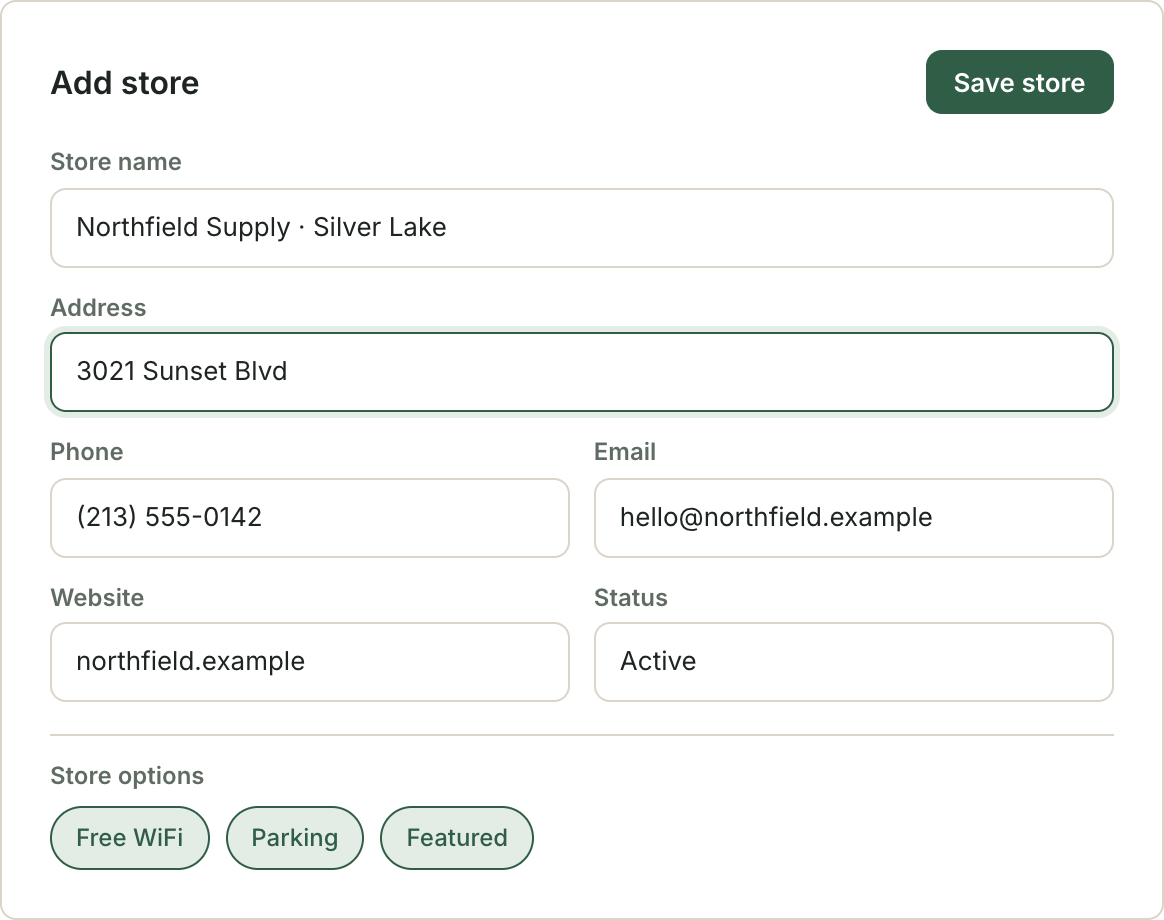
Add store form
Coordinates, found for you
Type the address and Storemapify finds the latitude and longitude. Drag the pin if you want it exactly right.
- Matched address shown for checking
- Choose the right place if several match
- Type exact values if you prefer
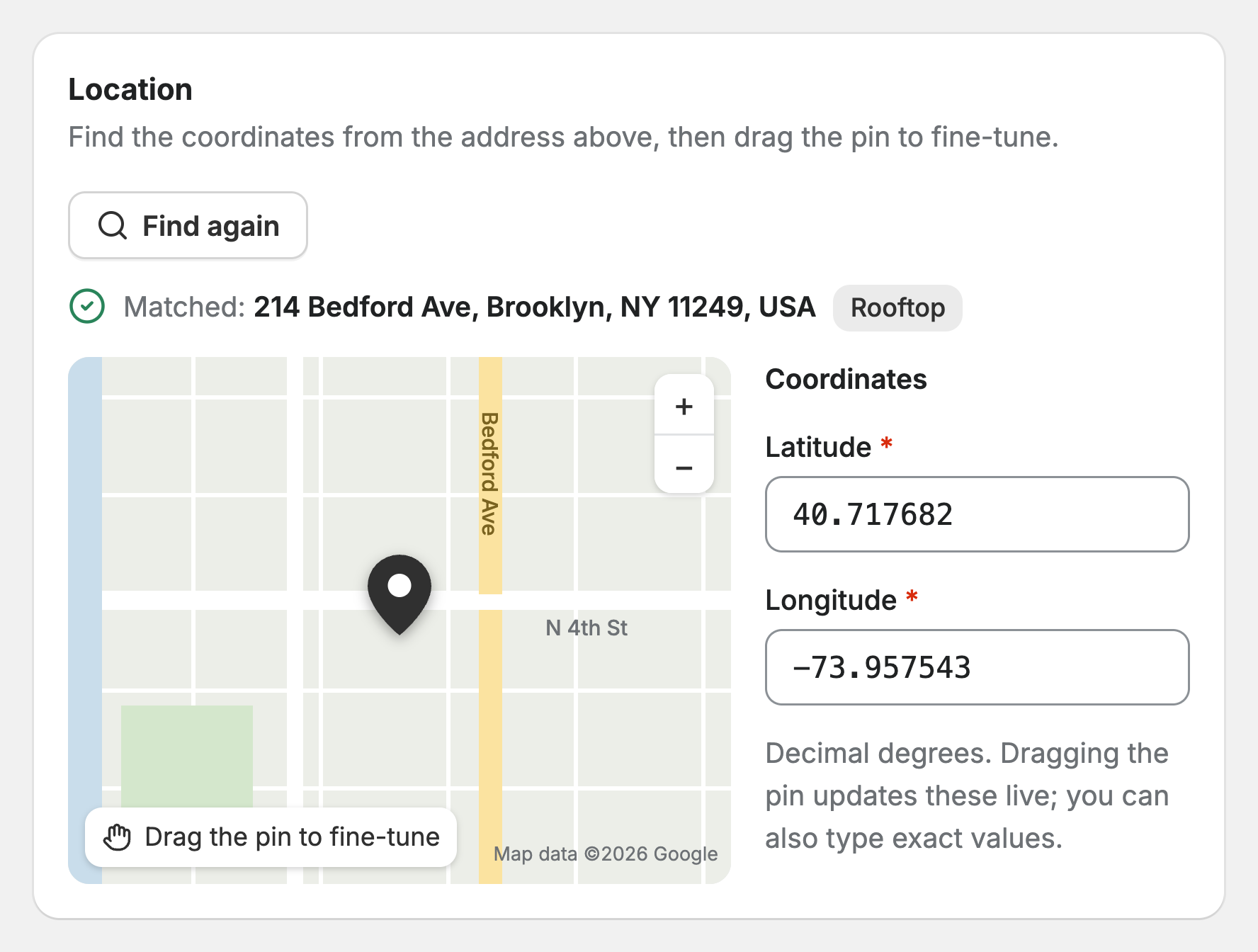
Automatic latitude and longitude
Free WiFi
Show shoppers which stores offer WiFi.
Parking
Let people know where they can park.
Featured stores
Highlight a flagship or new location.
Working hours
Set hours once and copy them across the week.
03 · Managing many stores
Bulk import and export
Bring in all your stores from one CSV file. We read every row and flag anything that needs a second look.
- Download a ready template
- Preview before you import
- Export any time to edit in a spreadsheet
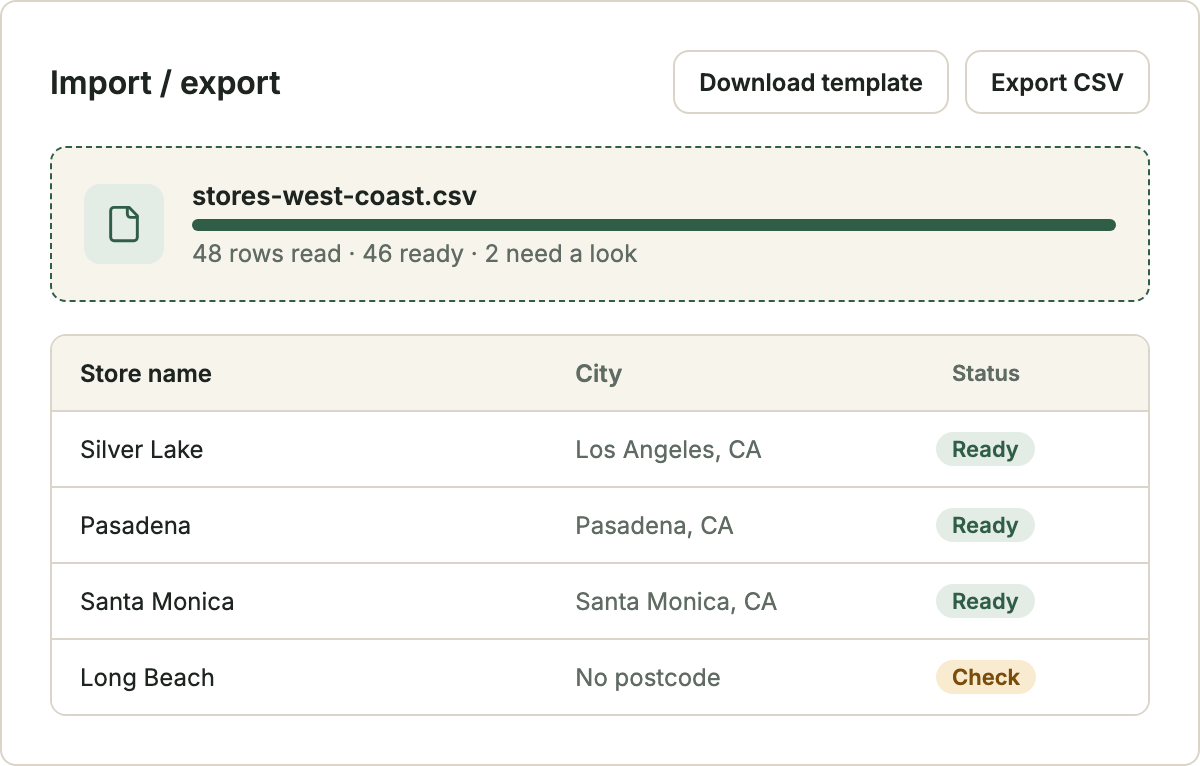
CSV import and export
Sync with Google Sheets
Keep your stores in a Google Sheet and sync them here. Share a read-only link; no Google sign-in is needed.
- Sync when you choose
- Auto-sync on a schedule
- Column guide and troubleshooting built in
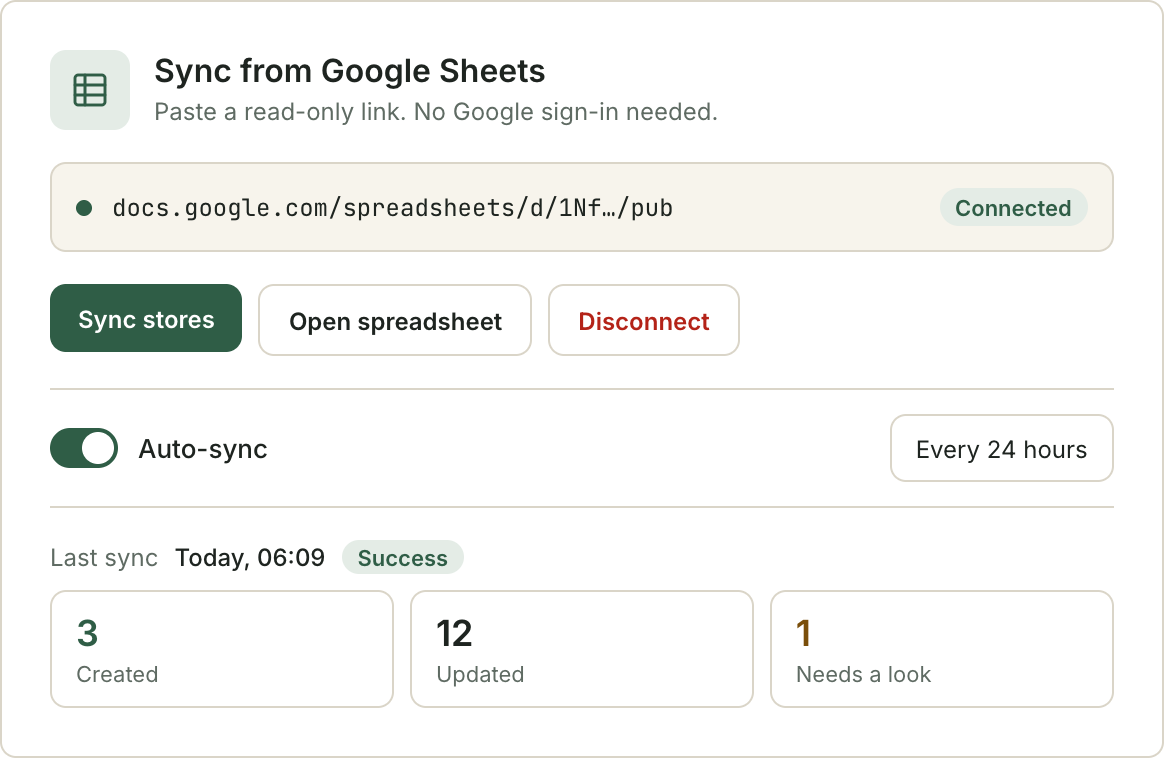
Google Sheets sync
Predefined themes
Pick a colour preset or set your own.
Custom marker
Use your logo or icon as the map pin.
Map variations
Choose the map style that suits your theme.
Zoom level
Set how close the map opens for shoppers.
04 · Insights
See where shoppers search
Popular searches show which towns and postcodes people look for most. Useful when you plan a new store.
- Last 7, 30 or 90 days
- Ranked by number of searches
- No extra setup
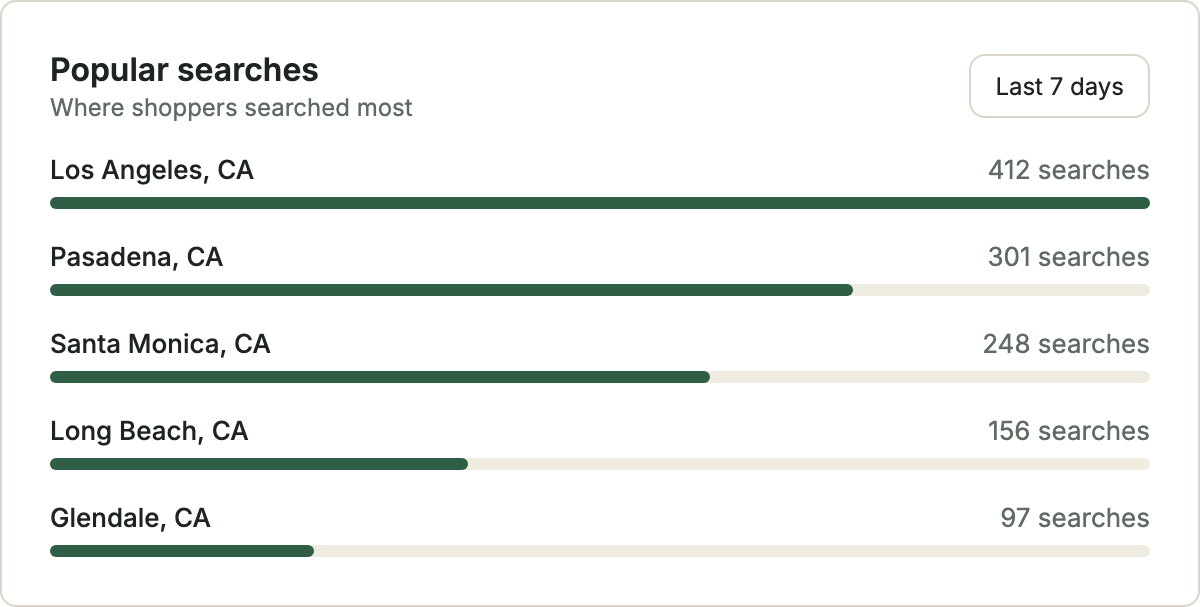
Popular searches · sample data
A heatmap of interest
The search heatmap shows where demand gathers, so gaps in your coverage are easy to spot.
- Show or hide your stores
- Filter by date range
- Searches grouped by area
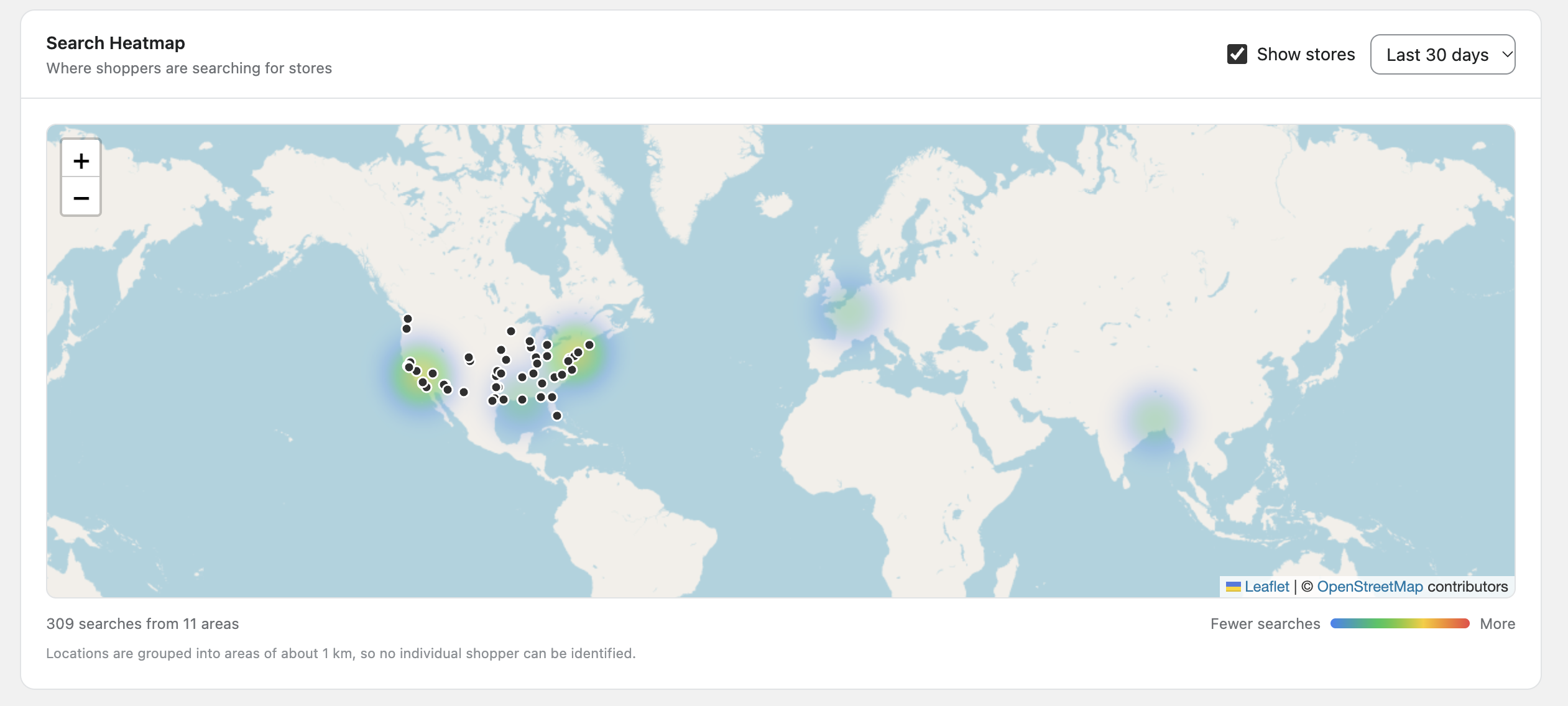
Search heatmap
Recent searches
The latest searches, as they happen.
Active stores
Your total active stores, always up to date.
Weekly breakdown
Searches and views, week by week.
Setup wizard
A short checklist to get live with confidence.
Pricing
Simple plans, no surprises
Both prices shown: monthly or yearly.
Free
$0 /month
Perfect for getting started
- 5 store locations
- Store locator on your storefront
Map, store list, address search, directions - 1 locator layout
The Default layout - Single store pages
- Map styles & start location
- Community support
Starter
$9.99 /month
or $69.93 for the first year, then $99.90/year
Ideal for small business
Everything in Free, plus:
- 50 store locations
- Smart store entry
Address suggestions and automatic coordinates - Auto-detect shopper location
- CSV import & export
- Google Sheets sync
Sync stores from a shared sheet - Remove app branding
- 2 locator layouts
Default and Minimal - Custom branding: theme colours & map marker
- Email support
Growth
Most popular
$19.99 /month
or $109.95 for the first year, then $199.90/year
Best for growing brands
Everything in Starter, plus:
- Unlimited store locations
- Automatic Google Sheets sync
Keeps your stores up to date for you - Analytics dashboard
- Search heatmap
See where shoppers search - Premium layouts Coming soon
3 more layouts on the way, on top of your 2 - Priority support
Pro
Coming soon
$39.99 /month
or $399.90/year
7-day free trial
Stock, WhatsApp and AI search
Everything in Growth, plus:
- Unlimited store locations
- Live stock in store
Stock rebalancing between stores, plus an AI lost-sales estimate - WhatsApp assistant
Shoppers get store details, hours and directions on your WhatsApp number - AI store pages
Unique AI-written copy for every store, in every language, so pages can rank on Google - Plain-words search and AI shopping assistants
Shoppers and AI assistants find the right store from natural language - AI expansion planner
Shows where to open your next store
Coming soon
Billed securely through your Shopify account.
Detailed feature comparison
Compare all features across our pricing plans.
| Feature | Free | Starter | Growth Most popular | Pro |
|---|---|---|---|---|
| Store locator | ||||
| Store locations | 5 | 50 | Unlimited | Unlimited |
| Map + store list | Included | Included | Included | Included |
| Address search | Included | Included | Included | Included |
| Directions (Google Maps) | Included | Included | Included | Included |
| Single store pages | Included | Included | Included | Included |
| Map styles & start location | Included | Included | Included | Included |
| Address suggestions & auto coordinates | Not included | Included | Included | Included |
| Auto-detect shopper location | Not included | Included | Included | Included |
| Locator layouts | 1 | 2 | 2 + 3 coming soon | 2 + 3 coming soon |
| Import & sync | ||||
| CSV import & export | Not included | Included | Included | Included |
| Google Sheets sync (manual) | Not included | Included | Included | Included |
| Automatic Google Sheets sync | Not included | Not included | Included | Included |
| Branding & design | ||||
| Remove app branding | Not included | Included | Included | Included |
| Custom theme colours | Not included | Included | Included | Included |
| Custom map marker | Not included | Included | Included | Included |
| Insights | ||||
| Analytics dashboard | Not included | Not included | Included | Included |
| Search heatmap | Not included | Not included | Included | Included |
| Stock, WhatsApp & AI | ||||
| Live stock in store | Not included | Not included | Not included | Included |
| WhatsApp assistant | Not included | Not included | Not included | Included |
| AI store pages | Not included | Not included | Not included | Included |
| Plain-words search & AI assistants | Not included | Not included | Not included | Included |
| AI expansion planner | Not included | Not included | Not included | Included |
| Support | ||||
| Support | Community | Priority | Priority | |
Cancel anytime
Uninstall or cancel in one step. No calls, no forms, no exit survey.
Real human support
You write to the people who built it, not a ticket bot.
Reply within 1 business day
Usually sooner. If a fix takes longer, we tell you when to expect it.
Setup
Live in three steps
01
Install
Add StoreMapify from the Shopify App Store. No code, no theme edits.
02
Add your stores
Import a CSV, sync Shopify locations, or add them one by one.
03
Publish
Drop the app block onto any page in the theme editor and save.
Reviews
What merchants say
Placeholder reviews · pull real ones from the Shopify App Store
Placeholder. A specific line about how quick setup was and how well it matched the theme.
Store name · United Kingdom · Sep 2026
Placeholder. A line about a support question answered clearly and quickly.
Store name · Canada · Aug 2026
Placeholder. A line about customers finding the nearest store more easily.
Store name · Australia · Jul 2026
Will StoreMapify slow down my store?
No. It loads after your page content and only on pages that use it. We test every release against Core Web Vitals.
Which themes does it work with?
Any Online Store 2.0 theme via an app block. For older themes we provide a short snippet and will help you add it.
Can I import my existing locations?
Yes. Upload a CSV or sync from Shopify locations. You see a preview and any address issues before anything is saved.
What happens if I uninstall?
Billing stops straight away and the locator disappears from your theme. Your location data stays exportable for 30 days.
How does billing work?
Charges appear on your regular Shopify invoice. We never see or store your card details.
Can I switch plans later?
Yes, at any time. Upgrades apply straight away; downgrades take effect at the end of the billing period.
Do you offer refunds?
Shopify plans can be cancelled before any charge.